Domain & Network Ops for AI Agents: MCP Integration Guide (2026)
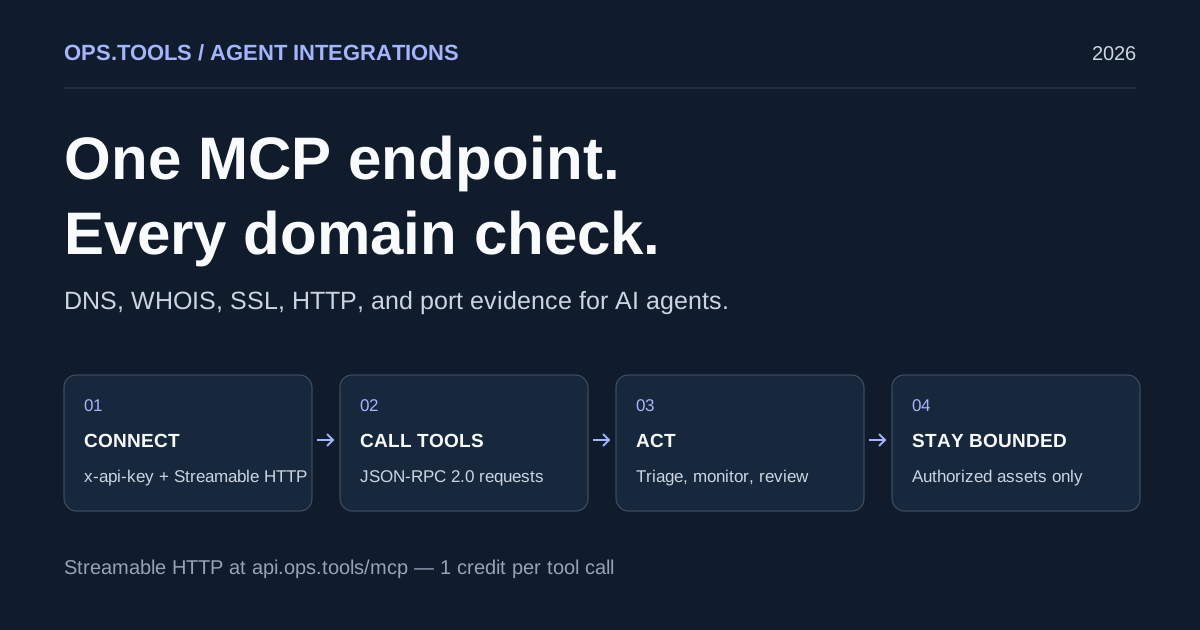
An agent that answers “is this domain healthy?” needs the same evidence a human operator uses: current DNS records, registration context, certificate validity, response headers, and open ports. Wiring each of those checks as a separate REST call into every agent runtime gets repetitive fast, and tool descriptions drift from the real contract.
The Model Context Protocol (MCP) fixes the plumbing. Ops.Tools exposes its domain and network checks as tools on a hosted MCP server at https://api.ops.tools/mcp. Your agent connects once, discovers the tools, and calls them with JSON-RPC over Streamable HTTP. The same API key, credits, and usage logs you already use for the REST API apply.
This guide covers client setup, a walkthrough of each tool with realistic requests and responses, three operator use cases, a triage runbook your agent can follow, and the guardrails that keep an autonomous agent inside authorized territory.
What the Ops.Tools MCP server exposes
The server speaks the MCP Streamable HTTP transport: one endpoint, POST https://api.ops.tools/mcp, carrying JSON-RPC 2.0 messages. Requests must send Accept: application/json, text/event-stream. In non-production environments the endpoint follows the configured API base (NEXT_PUBLIC_API_URL_MODULE_APP plus /mcp).
Authentication reuses your Ops.Tools API key in the x-api-key header. Create keys under Account → API keys. Keys are host-scoped: a key issued for another product host is rejected, so an agent cannot silently wander onto a different service. For a limited trial without an account key, the demo key demo-key works with a valid TOTP in the x-ct header, rate-limited.
Billing is simple: every successful tool call consumes 1 credit from the key owner, and account_whoami is free. When credits run out the server answers with HTTP 402, and the agent should point the user at pricing to top up. The initialize result carries these auth and billing instructions to the agent, so a well-behaved client learns the contract from the server itself.
Discovery is machine-readable end to end: /llms.txt, /.well-known/mcp-server-card, and the Scalar MCP panel on the API reference for one-click connection while you evaluate.
1. Connect an MCP client
Any MCP-capable client or agent runtime that supports HTTP servers works with the same block. Replace YOUR_API_KEY with a key from Account → API keys.
{
  "mcpServers": {
    "ops-tools": {
      "type": "http",
      "url": "https://api.ops.tools/mcp",
      "headers": { "x-api-key": "YOUR_API_KEY" }
    }
  }
}
To see the handshake by hand, send initialize and tools/list with curl. The server is stateless per request, so no session header is required.
curl --fail-with-body --silent --show-error --max-time 20 \
  -X POST 'https://api.ops.tools/mcp' \
  --header "x-api-key: ${OPS_TOOLS_API_KEY}" \
  --header 'Content-Type: application/json' \
  --header 'Accept: application/json, text/event-stream' \
  --data '{"jsonrpc":"2.0","id":1,"method":"initialize","params":{"protocolVersion":"2026-07-28","capabilities":{},"clientInfo":{"name":"triage-agent","version":"1.0.0"}}}'

curl --fail-with-body --silent --show-error --max-time 20 \
  -X POST 'https://api.ops.tools/mcp' \
  --header "x-api-key: ${OPS_TOOLS_API_KEY}" \
  --header 'Content-Type: application/json' \
  --header 'Accept: application/json, text/event-stream' \
  --data '{"jsonrpc":"2.0","id":2,"method":"tools/list"}'
The initialize result announces the server and embeds the agent-facing instructions. Excerpt:
{
  "jsonrpc": "2.0",
  "id": 1,
  "result": {
    "protocolVersion": "2026-07-28",
    "serverInfo": { "name": "any-xyz", "version": "1.0.0" },
    "capabilities": { "tools": {} },
    "instructions": "Authentication: send your API key in the x-api-key header ... Billing and usage: every successful tool call consumes 1 credit except account_whoami ... a HTTP 402 response means the account is out of credits ..."
  }
}
2. Walk the tools
Every tool is a read-only lookup annotated with readOnlyHint and idempotentHint, so agents can call them safely in read paths.
| Tool | Returns | Notes |
|---|---|---|
account_whoami | Account identity behind the key | Free, no credit cost |
ops_dns_lookup | A, AAAA, MX, TXT, and more record types | Optional skipCache for freshness |
ops_whois | Registrar, dates, name servers, status | Optional parsed JSON with parseWhoisToJson |
ops_ssl_check | Certificate validity window, issuer, chain health | Includes daysRemaining |
ops_http_analyze | Security headers, grade and score, caching, cookies | Takes a full URL, follows redirects by default |
ops_port_scan | TCP port state, service detection, banners | Available on request — gated by the platform, not enabled by default |
Tool calls use the standard tools/call method. Here is ops_ssl_check against example.com.
{
  "jsonrpc": "2.0",
  "id": 3,
  "method": "tools/call",
  "params": {
    "name": "ops_ssl_check",
    "arguments": { "domain": "example.com" }
  }
}
{
"jsonrpc": "2.0",
"id": 3,
"result": {
"content": [
{ "type": "text", "text": "{ ...certificate JSON mirrored in structuredContent... }" }
],
"structuredContent": {
"domain": "example.com",
"port": 443,
"certificate": {
"subject": "CN=example.com",
"issuer": "CN=DigiCert TLS RSA SHA256 2020 CA1, O=DigiCert Inc, US",
"validFrom": "2026-09-08T04:00:00.000Z",
"validTo": "2026-12-07T03:59:59.000Z",
"daysRemaining": 27,
"isValid": true,
"isExpired": false,
"isSelfSigned": false
},
"chain": { "chainLength": 3, "isValidChain": true }
}
}
}Each result carries both a machine-readable structuredContent object and a text mirror, so simple clients that only render text still see the same data. A triage rule as plain as daysRemaining < 21 → page on-call reads straight off the response.
The remaining tools follow the same envelope. Compact examples:
{
  "jsonrpc": "2.0", "id": 4, "method": "tools/call",
  "params": { "name": "ops_dns_lookup", "arguments": { "address": "example.com", "type": "MX" } }
}

{
  "jsonrpc": "2.0", "id": 4,
  "result": {
    "content": [{ "type": "text", "text": "..." }],
    "structuredContent": { "success": true, "address": "example.com", "type": "MX", "records": ["0 ."] }
  }
}
{
"jsonrpc": "2.0", "id": 5, "method": "tools/call",
"params": { "name": "ops_whois", "arguments": { "domain": "example.com", "parseWhoisToJson": true } }
}
{
"jsonrpc": "2.0", "id": 5,
"result": {
"content": [{ "type": "text", "text": "..." }],
"structuredContent": {
"domain": "example.com",
"whoisText": "Domain Name: EXAMPLE.COM ...",
"whoisJson": {
"registrar": "RESERVED-Internet Assigned Numbers Authority",
"creationDate": "1995-08-14T04:00:00Z",
"expirationDate": null,
"nameServers": ["A.IANA-SERVERS.NET", "B.IANA-SERVERS.NET"]
}
}
}
}{
"jsonrpc": "2.0", "id": 6, "method": "tools/call",
"params": { "name": "ops_http_analyze", "arguments": { "url": "https://example.com" } }
}
{
"jsonrpc": "2.0", "id": 6,
"result": {
"content": [{ "type": "text", "text": "..." }],
"structuredContent": {
"url": "https://example.com",
"finalUrl": "https://example.com/",
"statusCode": 200,
"analysis": {
"security": {
"grade": "C",
"score": 55,
"missingHeaders": ["content-security-policy", "strict-transport-security"]
}
}
}
}
}{
"jsonrpc": "2.0", "id": 0, "method": "tools/call",
"params": { "name": "account_whoami", "arguments": {} }
}
{
"jsonrpc": "2.0", "id": 0,
"result": {
"content": [{ "type": "text", "text": "..." }],
"structuredContent": {
"userId": "usr_9f2c...",
"email": "ops@yourcompany.example",
"username": "ops-engineer",
"reqIpCountry": "DE"
}
}
}Values above are illustrative; field coverage varies by registry and target. Treat an absent field as “not provided,” never as “passed” — the discipline data cleansing use cases apply to every source. Validate the exact schemas in the API reference before encoding hard rules.
3. Put the tools to work
Incident triage
When a monitor fires, the first question is scope. An agent can resolve the hostname, confirm the certificate is still valid, and capture response headers in one pass, then attach the raw JSON to the ticket. This mirrors the evidence-first flow in the domain incident response runbook, with the agent assembling the evidence pack instead of an on-call engineer copying curl output.
Expiry monitoring
Registrations and certificates fail on calendar time, not on traffic. A scheduled agent can walk the portfolio, read daysRemaining from SSL checks and expiration dates from WHOIS, and escalate only what crosses a threshold. The expiration monitoring workflow describes the alert policy; MCP just changes who executes it.
Security review
Header grades, certificate posture, and registration context feed vendor and pre-launch reviews. An agent can produce the evidence rows for the alert enrichment or review checklist without a human opening a scanner UI, and every claim links back to a stored tool result.
4. An agent runbook example
A bounded runbook keeps the agent predictable. For a hostname triage task:
- Call
account_whoami(free) to confirm which account the run bills to. - Check the target against your asset allowlist before anything else. Reject unknown targets and stop.
ops_dns_lookupfor A/AAAA (or MX for mail incidents); record resolver errors as unknown, not healthy.ops_ssl_check; flagdaysRemainingunder 21, expired, self-signed, or broken chains.ops_http_analyzefor status code, redirects, and the header grade.- Summarize findings with the evidence IDs, attach raw results, and page only on your policy conditions.
- On HTTP 402, stop and tell the user to top up at
https://ops.tools/pricing; never retry in a loop.
Cap the number of tool calls per run and per host, and keep the transcript so the run is auditable. The agent guardrails guide covers budgets, allowlists, and evidence retention in depth.
5. Scan only what you are authorized to test
Ops tools are read-only lookups, but they probe third parties: lookups hit resolvers and registries, and port checks touch the target host directly. An agent with a scanning tool can send traffic at assets your team has no relationship with, which is why ops_port_scan itself carries the instruction to only scan assets you are authorized to test, and why it is disabled by default and enabled per request.
Enforce authorization in your agent, not just in prompts: allowlist domains and IPs, map them to an owning team, and refuse anything unlisted. For third-party assets, keep written permission on file. The platform gates the tool; your runtime gates the targets.
6. Billing: one credit per tool call
Every successful tool call consumes 1 credit from the API key owner; account_whoami is free, so identity checks and credit balance reads cost nothing. Usage lands in the same account usage logs as REST calls, which keeps agent spend visible next to your other workflows.
An HTTP 402 response means the account is out of credits. A well-behaved agent stops, surfaces the message, and points the user to the pricing page to top up, then retries after new credits exist. Model your runbook budgets against check frequency — a portfolio of N hostnames at three billable calls per triage run spends 3N credits per cycle.
Questions operators ask
Can I try the server before creating a key?
Yes, within limits. Send the demo key demo-key with a valid TOTP in x-ct. Demo access is rate-limited and returns null identity fields from account_whoami. Production agents should use a real key from Account → API keys.
How does my agent discover the tools without hardcoding them?
Send tools/list after initialize; the response carries each tool, its input schema, and its annotations. Outside a session, /llms.txt and /.well-known/mcp-server-card describe the same surface for crawlers and IDEs.
Is a failed lookup evidence that the domain is broken?
No. Resolver errors, timeouts, and missing data are unknowns, not verdicts. Keep the raw result, mark the check unknown, and fall back to authoritative sources before acting on it.
Start with a free account_whoami, run ops_ssl_check against one of your own domains, and read the full contract in the API reference. Professional plans starting at $6.99/month. When the triage runbook is stable, wire it into the incident channel your team already watches.
Give your agents real domain and network evidence
Connect the MCP server, run a free account_whoami, and wire the DNS, WHOIS, SSL, and HTTP checks into your next incident or review workflow.
Related articles
More guides from the same operational area.
Dangling DNS Cleanup: A Safe Service Retirement Workflow
Retire services safely with dangling DNS cleanup, bulk checks, certificate and domain retention decisions, and a CI approval gate before releasing resources.

OpenAPI Contract Tests for Infrastructure APIs in 2026
Build OpenAPI contract tests for DNS, WHOIS, IP, SSL, HTTP, port, and usage endpoints so CI catches schema drift before production workflows break.

Customer Domain Onboarding Automation in 2026: Validate DNS, SSL, IP, and WHOIS Before Go-Live
Build a customer-domain readiness gate with DNS ownership checks, WHOIS context, IP ownership, SSL validation, headers, scoped ports, bulk runs, and webhook routing.